


Cập nhật (Ngày 1 tháng 10 năm 2026): Bài viết này đã được cập nhật…
Edit your AI-generated scripts when you convert Slides to Vids
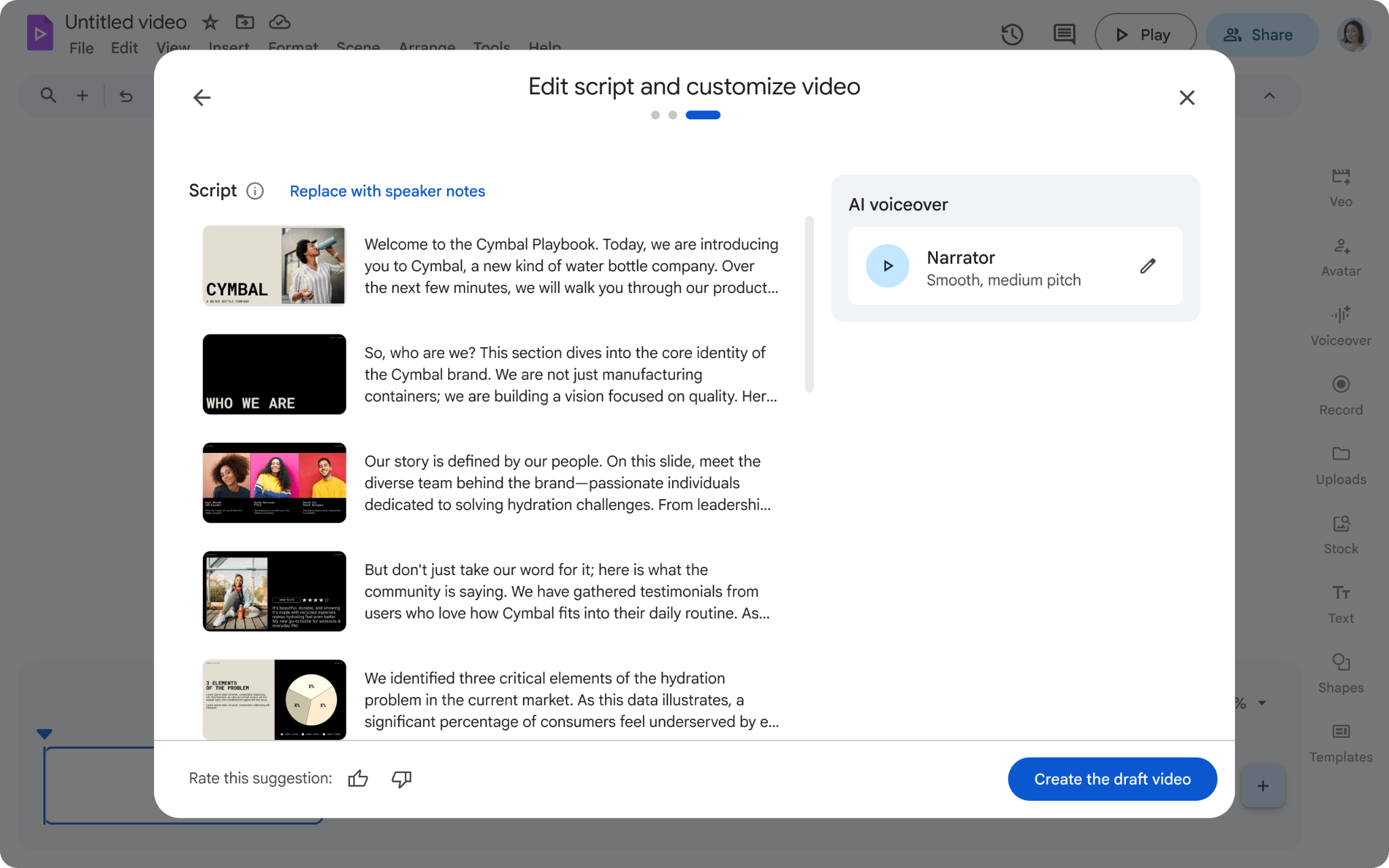
Now when you import Slides into Google Vids with Gemini enabled, you can see and edit your AI-generated scripts for each slide before completing the import, generating voiceovers, and applying animations. Previously, these edits could only be made after the import process was finished.
This update allows you to:
- Complete the presentation content right from the start: Review and adjust the AI-generated script or choose to use your original notes for each slide before creating a video draft.
- Save time and effort: By adjusting the script from the start, you minimize the need for multiple edits once the video has been imported into the main editor.
- Customize your voiceover: Ensure the voiceover perfectly matches the message you want to convey by finalizing the text before the audio is created.
Whether you are turning a sales deck into a quick pitch or transforming a lesson plan into an educational video, this change provides a more streamlined workflow for creating high-quality video content from your existing presentations.
Getting started
- Admins: There is no admin control for this feature.
- End users: This feature will be ON by default and can be disabled by the user in the Convert Slides workflow. To see the script editing screen, users must have the "Include AI voiceover, script, and background music" toggle enabled. If disabled, Vids will automatically begin the import after selecting slides.
Rollout pace
- Rapid Release domains: Gradual rollout (up to 15 days for feature visibility) started on March 31, 2026
- Scheduled Release domains: Full rollout (1–3 days for feature visibility) starting on April 14, 2026
Availability
- Business: Business Starter, Standard, and Plus
- Enterprise: Enterprise Starter, Standard, and Plus
- Education: Education Plus, Teaching and Learning add-on
- Consumer: Google AI Pro and Ultra
- Other Editions: Enterprise Essentials, and Enterprise Essentials Plus; Nonprofits
- AI Add-ons: AI Ultra Access; AI Expanded Access; Google AI Pro for Education
Related Posts