


Google Cloud Data Agent Kit đã chính thức phát hành diện rộng. Data Agent Kit…
Gemini Omni 1.1 Flash now in Vids with improved extension quality, 1080p, and duration control
Google has officially integrated the Gemini Omni 1.1 Flash model into Google Vids, marking a significant milestone in the application of generative AI to corporate video production. This update delivers a major leap in quality, enabling seamless scene extension, precise duration control, and the upscaling of entire videos to a broadcast-ready Full HD 1080p resolution.
Key Highlights:
- Superior Scene Extension: Maintains consistency in characters, lighting, and audio throughout extended footage.
- Precise Duration Control: Allows for flexible adjustment of individual clip lengths to perfectly align with voiceover scripts.
- Full HD 1080p Resolution: Generate new content or upscale existing AI-created footage to a high-definition standard.
Gemini Omni 1.1 Flash in Google Vids: Solving the Consistency Challenge in AI Video
One of the most significant hurdles for previous AI video-generation tools has been inconsistency between segments—such as characters’ appearances shifting, lighting changing abruptly, or audio falling out of sync.
Powered by Gemini 1.1 Flash, Google Vids has effectively resolved these issues, transforming the tool into a powerful assistant for corporate communications, internal training, and marketing teams.
Three breakthrough features that elevate enterprise video production:
Seamless scene extension (Video Extension)
Instead of piecing together fragmented short clips, the scene extension feature allows you to lengthen a video segment while preserving:
- The appearance and expressions of characters.
- The environment, surrounding context, and lighting sources.
- The synchronization and rhythm of background audio.
This ensures a seamless visual narrative, delivering a professional quality as if captured by a continuous camera shot.
Precise duration control
No longer constrained by fixed, AI-determined lengths, users can now specify the exact duration for each video segment.
- Perfectly align content with recorded scripts or automated voiceovers.
- Save hours of post-production editing on the timeline.
Crisp, high-quality output in Full HD 1080p
Blurry or low-quality visuals are no longer a concern when incorporating AI-generated video into corporate reports or public-facing campaigns:
- Direct creation: Generate AI segments in sharp 1080p resolution from the start.
- Upscaling: Easily convert lower-resolution footage to the 1080p standard, allowing it to blend smoothly with live-action footage on your timeline.
Availability Summary by Account Plan
This feature is enabled by default and requires no additional configuration by an administrator. The detailed availability is as follows:
| User Group | Supported Google Workspace customers Editions |
|---|---|
| Business & Enterprise | Business Starter, Standard, Plus; Enterprise Starter, Standard, Plus; Enterprise Essentials & Essentials Plus |
| Education | Education Add-Ons: Google AI Pro for Education, Teaching and Learning |
| Other | Personal Google Accounts; Google AI Pro & Ultra; Nonprofits; Google Workspace Individual |
💡Note on Usage Quotas:
Organizations with the "AI Expanded Access" add-on license benefit from significantly higher usage quotas for the Omni model within Google Vids—an ideal solution for teams involved in large-scale content production.
Getting Started with Google Vids Powered by Gemini Omni 1.1 Flash
- Access: Open Google Vids directly via your web browser or through Google Drive.
- Create Scenes: Select the AI video generation feature and enter a prompt describing the content you wish to create.
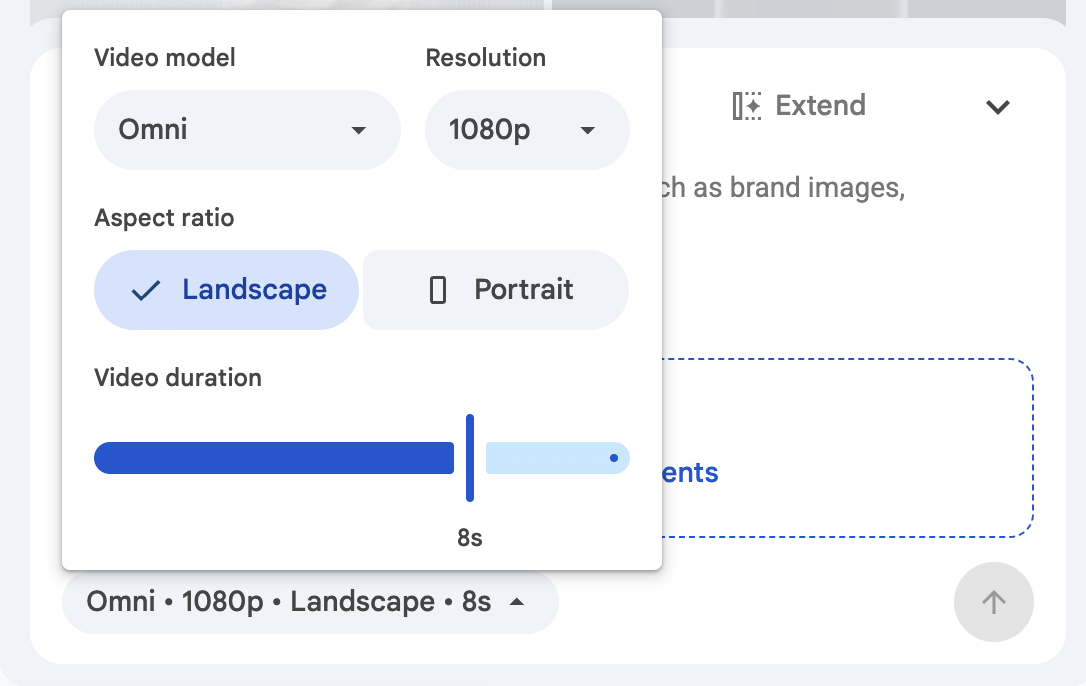
- Customize Duration & Resolution: Choose 1080p resolution and specify the exact duration (in seconds) for the generated content.
- Extend Footage: Use the "Extend" button on the timeline to lengthen specific scenes while maintaining consistent characters and lighting. Extend trên dòng thời gian để kéo dài phân cảnh yêu thích mà vẫn giữ nguyên nhân vật và ánh sáng.
Conclusion
The integration of Gemini Omni 1.1 Flash into Google Vids goes beyond a simple resolution upgrade; it streamlines the entire digital content production workflow. Now, anyone within an organization can produce high-quality presentation videos, training materials, or communication content in just a matter of minutes.
👉Have you explored this new feature in Google Workspace yet? Contact Contact Gimasys today to start testing it and optimize your team’s communication efficiency!
Related Posts