


Gemini 4 Argon mang lại hiệu năng cấp độ biên giới (frontier performance) trong các…
Improving the connection between Google Calendar events and Google Meet calls
For each video call, Meet attempts to connect the right Calendar event to determine:
- Who receives meeting records (ex. Gemini notes, recordings)
- Who is included in the continuous meeting chat in Google Chat
- Who can join the meeting without having to be manually admitted by the host
- Who can join the meeting without having to be manually admitted by the host
Reusing the same meeting code across multiple events can sometimes lead to ambiguity and unexpected behavior such as meeting artifacts being shared with the wrong guests (or no guests at all). We recently announced a change to reduce this ambiguity by stopping automatically copying Meet codes when duplicating Calendar events.
We are now fixing this ambiguity by having each Meet video call be tied to the initial Calendar event where it was created. This gives predictability and transparency about which guests receive notes, messages in Google Chat, recordings and other details from the meeting.
When users manually paste an old meeting code into a new Calendar event, they’ll see a dialog highlighting that the Meet code is still tied to the initial event. Codes created outside of Calendar (like instant meetings from meet.google.com) will remain unlinked.
Eg:
- If you reuse the meeting code from an old Calendar (Event A) on a new Calendar (Event B), meeting artifacts will only be shared with the host, co-hosts, and guests of the old Calendar event (Event A), and not guests of the new Calendar event (Event B).
- If you reuse a meeting code created from meet.google.com on a new Calendar event, meeting artifacts will only be shared with the meetings host and co-hosts, and not guests of the new Calendar event.
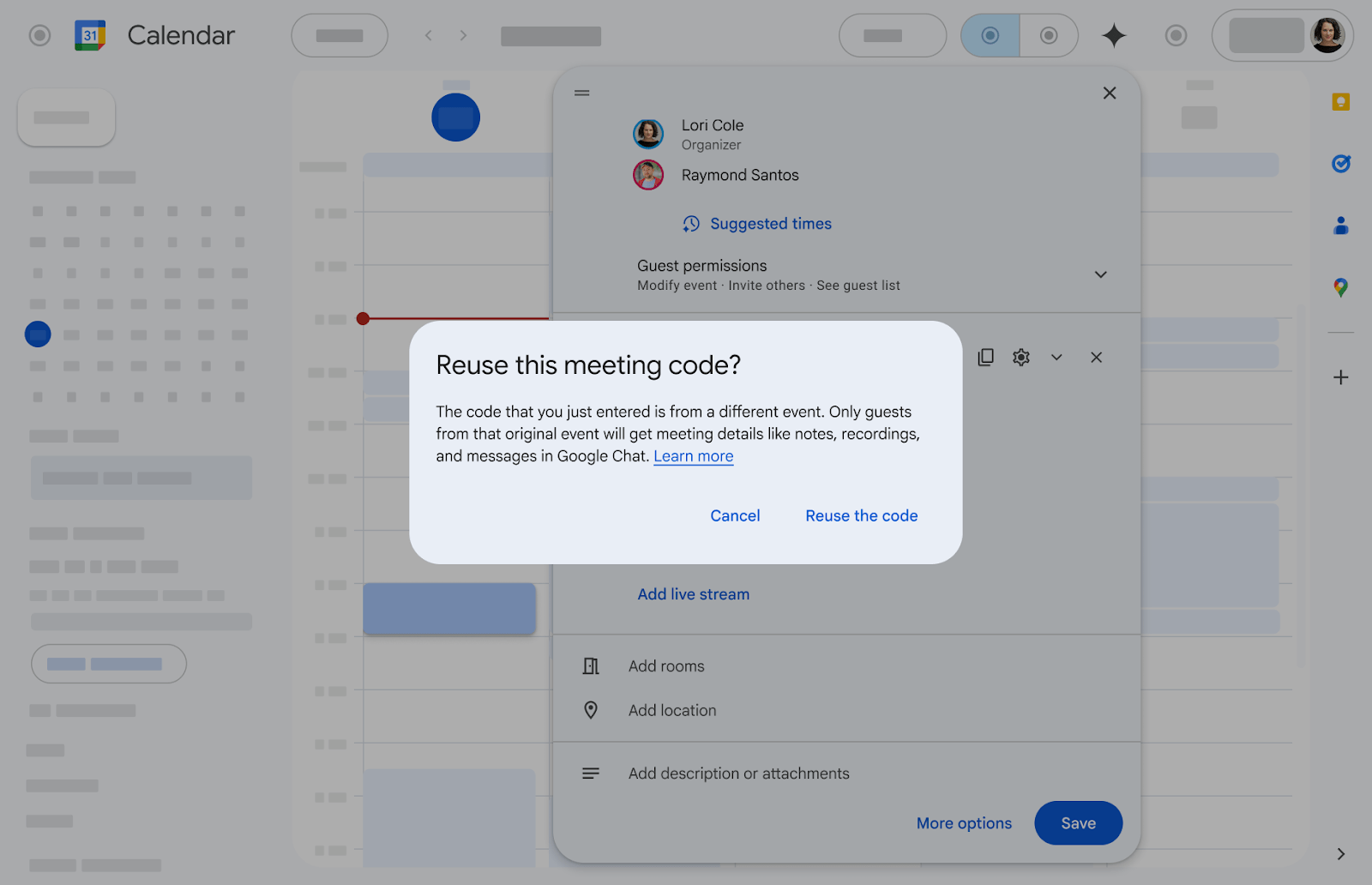 Warnings shown when reusing a meet code
Additional details
If you use Apple Calendar to create Google Calendar events with a Google Meet meeting code, the code will be updated automatically. This change ensures that each event uses a unique meeting code. Users receive an email informing them about the update.
Getting started
- Admins: There is no admin control for this feature.
- End users: There is no end user setting for this feature.
Rollout pace
Changes to behavior when creating Google Calendar event with meeting code in Apple Calendar
- Rapid Release domains and Scheduled Release domains: Gradual rollout (up to 15 days for feature visibility) starting on March 9, 2026
Changes to behavior when reusing meeting code in Google Calendar
- Rapid Release domains and Scheduled Release domains: Gradual rollout (up to 15 days for feature visibility) starting on March 23, 2026
Availability
- Available to all Google Workspace customers and users with personal Google accounts
Related Posts