


Google vừa chính thức mở rộng mô hình định giá cho Gemini Enterprise với phiên…
Introducing Ask Gemini in Chat: your new partner in productivity
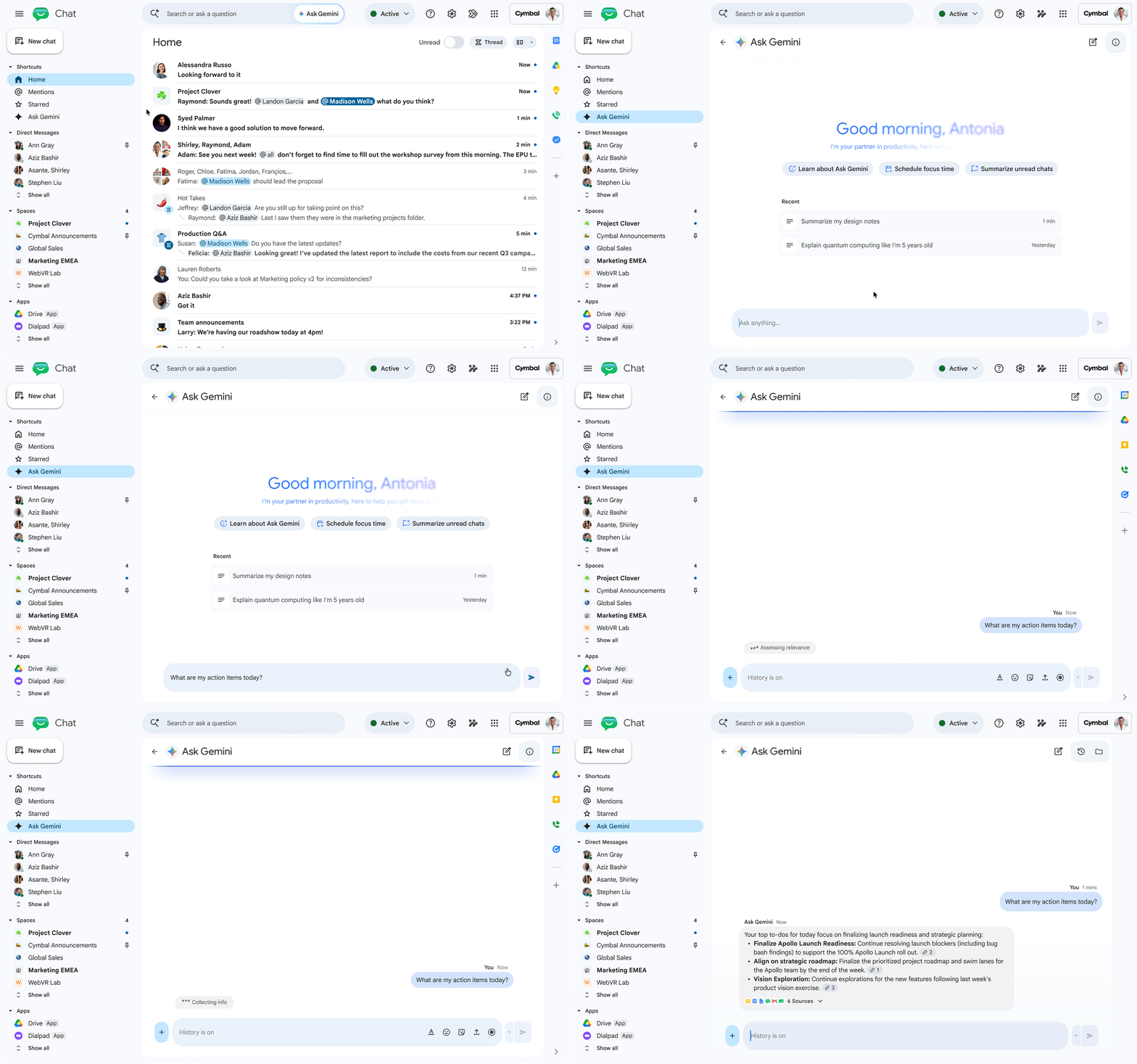
Google Chat is the central hub for real-time collaboration in Workspace, and starting August 26, 2026, it becomes the place where you can bring the power of Gemini into your flow of teamwork.
We’re introducing Ask Gemini in Google Chat, a unified command line for your work, powered by Workspace Intelligence.
What business problem does Ask Gemini in Google Chat solve?
In today's fast-paced work environment, employees often spend too much time switching between tabs, searching for past documents, or catching up on missed discussions. Ask Gemini was created to eliminate these bottlenecks by offering the following capabilities:
- Find instant answers: Leverage comprehensive data from your Workspace account (such as Gmail, Google Drive, or Calendar) to aggregate and return accurate, real-time information.
- Automated content creation: Quickly draft important announcements and emails to partners, or even generate illustrative images right within the chat window.
- Summary of the discussion: Easily stay on top of your work by asking Gemini to summarize the day's team chat conversations.
- Schedule and task management: Schedule important meetings and create to-do lists directly without interrupting the flow of conversation.
- Organize work systematically: Organize conversations with Gemini into separate sessions, making it easy to revisit or continue working on in-depth topics over time.
Important interface and data changes to note
The Ask Gemini update introduces several major changes to the user experience that IT departments and administrators need to be aware of:
| Legacy feature | New updates to Ask Gemini |
|---|---|
| Side panel | It will no longer appear in Chat. All features—such as file search, task notes, and conversation summaries—will be integrated directly into the new Ask Gemini command-line interface. |
| Gems | Users can no longer access Gems via the side panel in Chat. However, Gems remain available as usual on the side panels of other Workspace apps (such as Docs, Gmail, and Drive). |
| Old chat history | Chat history from the old Gemini side panel does not automatically transfer to Ask Gemini. Administrators or users (if permitted by the organization) can export data via Google Takeout (saved under “Gemini in Workspace” instead of “Google Chat”). |
Available languages: Initially, this change applies only to users who have set English as the default language for their Google accounts. Other languages (including Vietnamese) will continue to use the existing side panel and will receive support for the Ask Gemini update in subsequent phases.
Guide to activation and getting started
1. Admin
This feature will be automatically enabled by default if your organization has activated Gemini in Workspace (in Chat) and Workspace Intelligence for all applications.
2. For End-users
- Activate: Users need to register to participate in the program. Tính năng thông minh trong Workspace.
- Access location: Ask Gemini will appear in the left-hand menu, right within the section... Shortcuts of the Google Chat app.
- Quick shortcuts: Use the keyboard shortcut Ctrl + g (on Windows/Chrome OS) or Command + g (on macOS) to quickly launch the Ask Gemini assistant.
Limited-time promotion: From now until January 1, 2026, Workspace customers will receive increased usage limits for the Ask Gemini feature in Chat, allowing them to freely explore the tool and optimize their workflows. Standard usage limits will apply after this date.
Deployment Time and Availability
- Launch date: Gradual implementation begins on August 26, 2026 (It may take up to 15 days for the feature to fully appear on all accounts across the Rapid Release and Scheduled Release tracks).
- Applicable service package:
- Business: Business Standard and Business Plus.
- Enterprise: Enterprise Standard and Enterprise Plus.
- Education Add-ons: Google AI Pro for Education add-on package.
Partnering with Gimasys: Realizing the power of next-generation AI.
Integrating AI assistants like Ask Gemini into daily workflows is a strategic move that enables businesses to save hours of manual labor and boost employee creativity. However, to fully harness the potential of next-generation AI safely and securely, businesses require a standardized roadmap and a structured approach to user training.
As a Google Cloud Premier Partner in Vietnam, Gimasys Proud to offer a comprehensive solution that empowers businesses to master Ask Gemini and the Google Workspace ecosystem:
- Consulting & Optimization Setup: Help businesses precisely configure administrative permission settings, activate the intelligent Workspace Intelligence feature, and secure internal information.
- Enterprise-standard prompt engineering training: Gimasys offers workshops that guide personnel on how to formulate questions and prompts (Prompt Engineering) for Ask Gemini to create plans, summarize projects, or generate highly accurate content.
- Optimizing licensing costs: Advise on the upgrade roadmap to Gemini Business/Enterprise plans best suited to the business's scale and budget, while maximizing Google's promotional offers.
Don't miss the chance to boost your productivity with AI! Contact Gimasys today to receive in-depth advice on how to implement Ask Gemini in Google Chat and elevate your business's digital collaboration culture!
Related Posts