


Google đang giới thiệu mục Cuộc họp chuyên dụng trong Google Chat — một cách…
New user controls for Take notes for me
We are introducing more ways meeting hosts and participants can view and control “Take notes for me” in Google Meet.
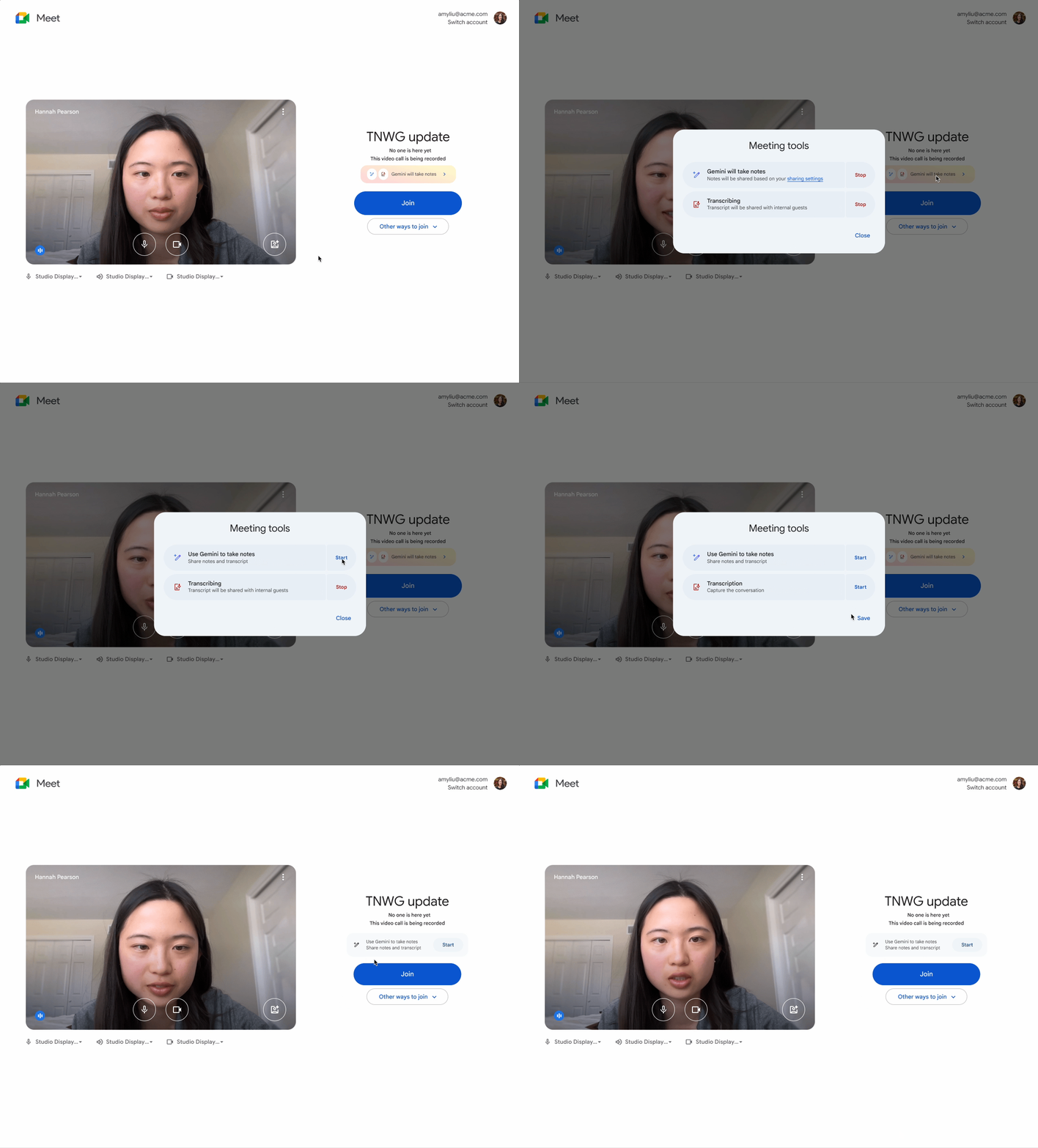 When participants join a call in Google Meet, they are first directed to a green room. In the green room, participants now see a more prominent notice when “Take notes for me” is enabled for a meeting they are about to join.
Additionally, eligible users can now turn off "Take notes for me" and transcription directly from the green room before joining a call that has yet to start. If the call has started, users can still stop or start notes at any time during the call.
Getting started
- Admins: There is no admin control for this feature.
- End users: Visit the Help Center to Take notes for me trong Google Meet.
Rollout pace
- Rapid Release domains: Gradual rollout (up to 15 days for feature visibility) starting on February 18th, 2026
- Scheduled Release domains: Gradual rollout (up to 15 days for feature visibility) starting on March 5th 2026
Availability
- Business Standard and Plus
- Enterprise Standard and Plus
- Google AI Pro for Education
- Frontline Plus
Related Posts