


Google vừa chính thức mở rộng mô hình định giá cho Gemini Enterprise với phiên…
Use Sheets canvas to visualize data in custom, interactive mini-apps
Google Sheets has long been a powerful tool for data storage and calculation. However, transforming complex spreadsheets into intuitive, user-friendly interfaces often requires programming skills, advanced formula knowledge, or reliance on third-party tools.
To break down this barrier, Google has officially introduced Sheets Canvas—a groundbreaking feature powered by Gemini AI that transforms static data rows and columns into custom, interactive applications capable of two-way read-write functionality, all through simple natural language commands.
What is Sheets Canvas?
Sheets Canvas functions as a dynamic, visual interface layer overlaid directly onto your existing spreadsheet data. Instead of staring at hundreds of rows of dry figures, you and your team can work with flexible, interactive layouts tailored to your department's actual operational workflows.
This feature is particularly useful when:
- Coordinate the implementation of cross-departmental projects using an intuitive interface.
- Extract and present key insights from massive datasets to leadership without the need for manual report preparation.
What are the key features of Sheets Canvas?
Whether you need to coordinate cross-departmental tasks or present key insights from vast amounts of data to leadership, Sheets canvas provides the visual tools to effectively meet those needs. Key features include:
- Create comprehensive content: Build advanced visualizations using only a natural language prompt—no coding, formulas, or third-party tools required.
- Comprehensive read-write capability: Any changes made on the canvas—such as dragging and dropping task cards or adding new items—are immediately updated in the source spreadsheet. Conversely, any updates in the source spreadsheet are reflected on the canvas in real time.
- Flexible adjustments: Continue refining the canvas in Sheets by asking Gemini to modify the layout, design, features, and various other elements.
- Familiar sharing tools: Since the canvas in Sheets is built directly into Google Sheets, it inherits the spreadsheet's sharing settings, making real-time collaboration incredibly easy.
For example, if you are a financial analyst working with a budget spreadsheet, you could ask Gemini: “Build an interactive dashboard to help me analyze the impact of various cost factors on the quarterly budget.” If you are an operations manager overseeing logistics, you simply need to instruct Gemini: “Create a custom tracking tool to visualize field tasks by region.”
Users can build a wide range of applications on the Sheets platform. Here are a few examples:
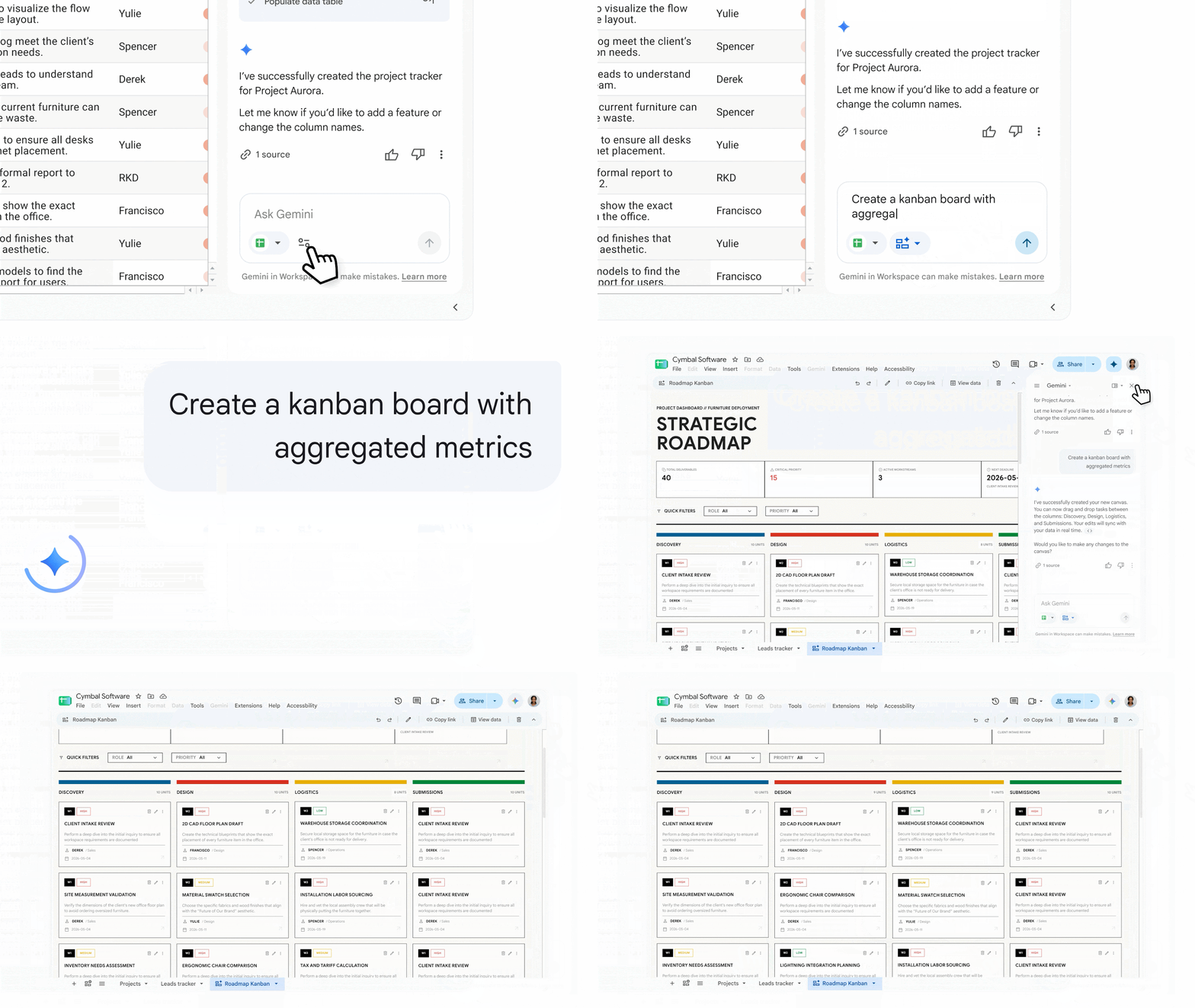 Kanban Board: Group tasks by workflow stage and drag-and-drop cards to update progress in real-time.
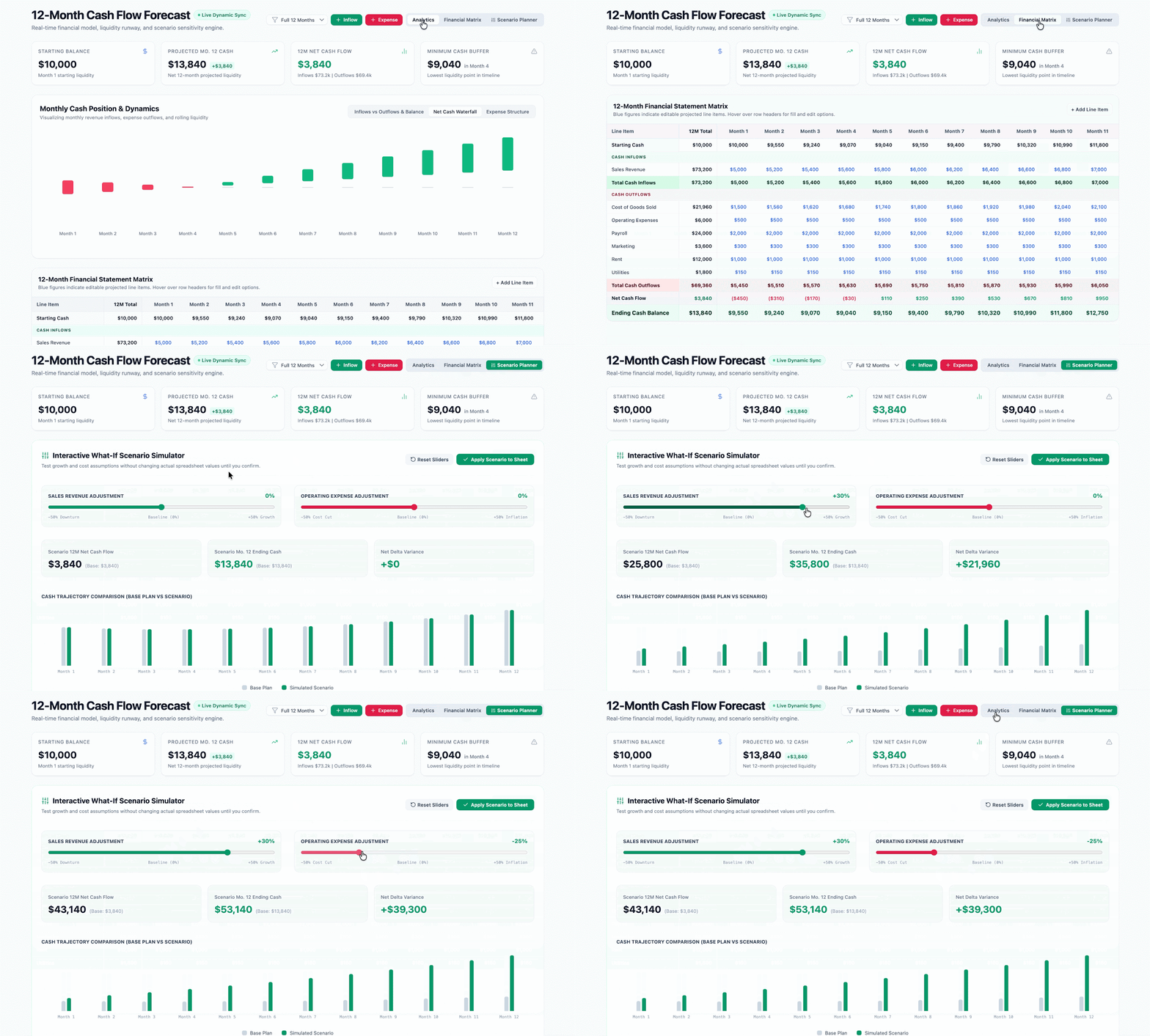
Dashboard: Build financial forecasting models with flexible scenario planning capabilities.
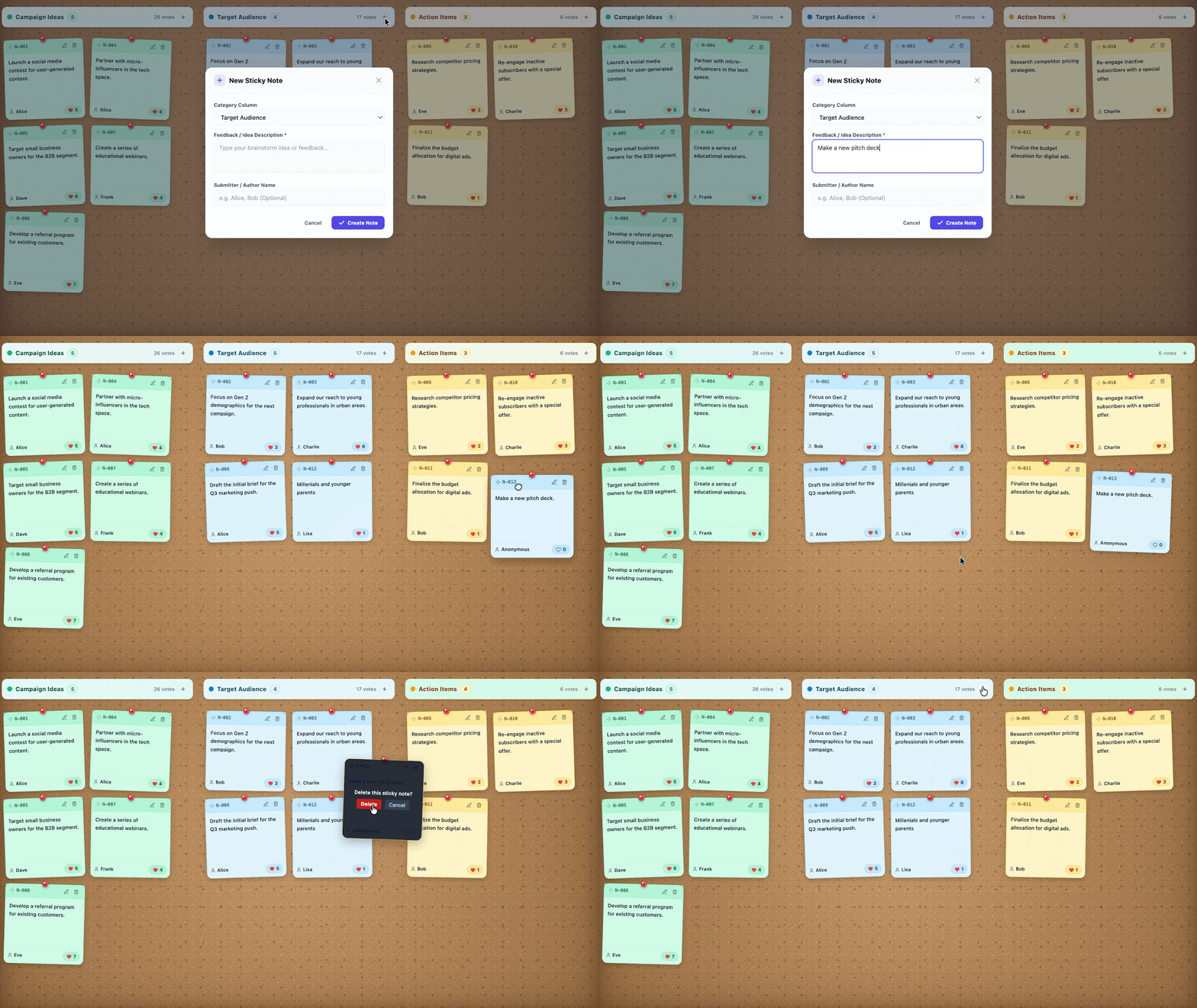
Whiteboard: Host an online brainstorming session using sticky notes.
Note: This feature is currently available only on the web platform for accounts set to English.
Getting Started Guide
1. Admin
- The feature is enabled by default for organizations and users granted access to Gemini in Google Sheets.
- Administrators can manage access scope via the Admin Console.
2. For End-users
- Make sure your account has the Smart Features option enabled in Workspace.Workspace Smart Features).
- Open a Google Sheets spreadsheet and click the Gemini icon in the right sidebar (Side Panel).
- Enter a description of the interface or interactive application you want to create to get started.
Deployment Time and Availability
Launch date:
- Rapid Release track: Rollout begins on August 10, 2026 (may take more than 15 days for full visibility).
- Scheduled Release Channel: Gradual rollout starting August 31, 2026 (up to 15 days for visibility).
Applicable service package:
- Enterprise: Business Standard, Business Plus, Enterprise Standard, Enterprise Plus.
- Education & Personal Enhancement: Google AI Pro for Education, Google AI Pro and Ultra (Consumer).
- AI Add-on Package: AI Expanded Access.
Unlock data potential with Gimasys.
Google Sheets Canvas is a clear demonstration of Google’s “AI-first” approach, blurring the line between a standard spreadsheet and a professional management application, and empowering any employee to create personalized work tools without needing to write code.
Với vai trò là Đối tác phát triển hàng đầu của Google Cloud tại Việt Nam, Gimasys sẵn sàng đồng hành cùng doanh nghiệp để chuyển hóa cách thức khai thác dữ liệu nội bộ:
- Data structure optimization consulting: Standardizing source datasets in Google Sheets to ensure Gemini generates the most accurate and effective Canvas applications.
- In-depth AI Prompting Skills Training: Organizing hands-on guidance programs for various departments (Finance, Sales, HR, Operations) on how to prompt Gemini to build suitable dashboards and management models.
- Google Workspace License Provisioning & Management: Advisory on the roadmap for acquiring Gemini Business/Enterprise licenses at optimal cost, along with 24/7 technical support.
Ready to turn spreadsheets into smart apps for your business? Contact Gimasys today to get solution advice and experience the latest AI features on Google Workspace!
Related Posts