


Google vừa chính thức mở rộng mô hình định giá cho Gemini Enterprise với phiên…
New enterprise security controls for Workspace Studio enable expanded collaboration use cases
Google Workspace Studio is ushering in a new era of enterprise productivity through custom, fully no-code "agentic automation" workflows. To scale multi-user collaboration while ensuring maximum information security, Google has officially introduced a comprehensive suite of enterprise-grade security controls, offering IT administrators complete peace of mind when deploying AI automation in real-world operations.
5 In-depth Security Control Mechanisms for Administrators
1. Identify agents based on the Principle of Least Privilege.
- Automation workflows in Studio still operate based on user identity but strictly adhere to the principle of least privilege. A workflow possesses only the minimum set of permissions required to execute a task, rather than inheriting the owner's full range of broad privileges.
- Each flow is assigned a unique identifier (auditable ID) to track and monitor all activities. (Note: This mechanism applies initially to newly created flows; support for existing flows will be added in subsequent phases.)
2. Tính năng Gán danh tính linh hoạt (Identity Attribution – Bản thử nghiệm)
- Administrators can decide whether actions performed by the flow appear under the owner's personal identity or are attributed to the flow itself (accompanied by the owner's information).
- This setting is enabled by default (prioritizing thread attribution), helping to clearly distinguish between manual human actions and tasks triggered by AI agents.
3. Audit & Observability
- All flow configuration and execution events are recorded in detail in the Workspace Studio audit logs.
- When a thread performs sensitive operations (such as editing a file in Google Drive or sending an email via Gmail), the audit log includes full context: Unique stream identifier and Owner information.
4. Agent Access Management & Security Investigation Tool (SIT) Integration
- The new admin dashboard allows administrators to quickly pause an entire flow or revoke specific OAuth scopes for individual flows (e.g., removing Drive access while retaining email-sending privileges).
- It integrates directly with the Security Investigation Tool (SIT), allowing you to navigate instantly from an alert event to the agent permission management page to isolate the incident in moments.
5. Human-in-the-Loop (HiTL) Mechanism & Data Loss Prevention (DLP)
- Management control: Admins can disable specific process steps, block Gemini's data access, or disable outbound webhook connections.
- Human-in-the-Loop (HiTL): Establish a requirement for end-users to... manual confirmation before the workflow executes steps to share sensitive data outside the organization.
- Real-time DLP:
- DLP for Gemini: The Drive data accessible to Gemini is based on content classification and security labels.
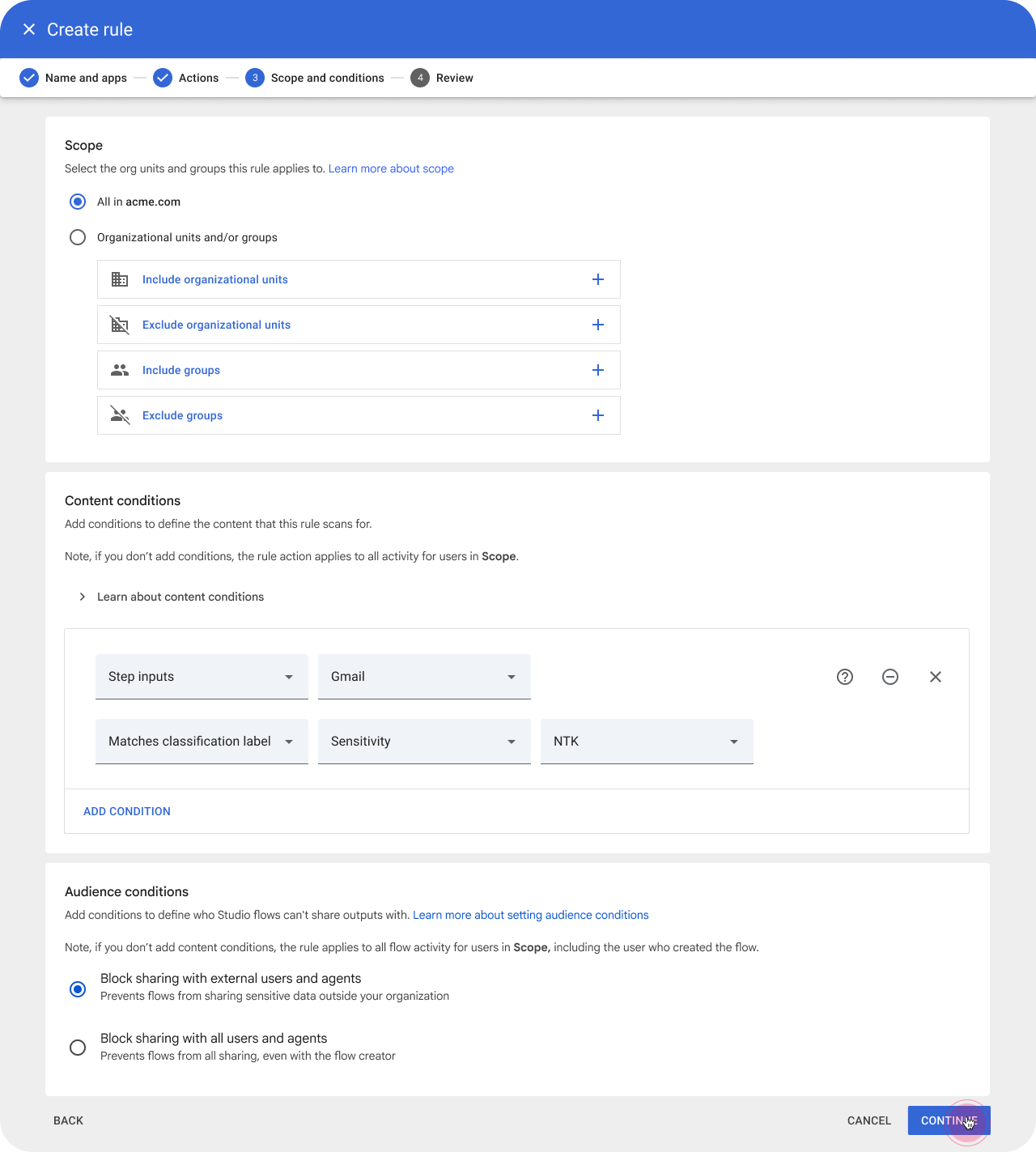
- DLP for Studio: Block or require user review for processes based on input data sources, processed data, and the display scope of output data.
Collaboration use cases
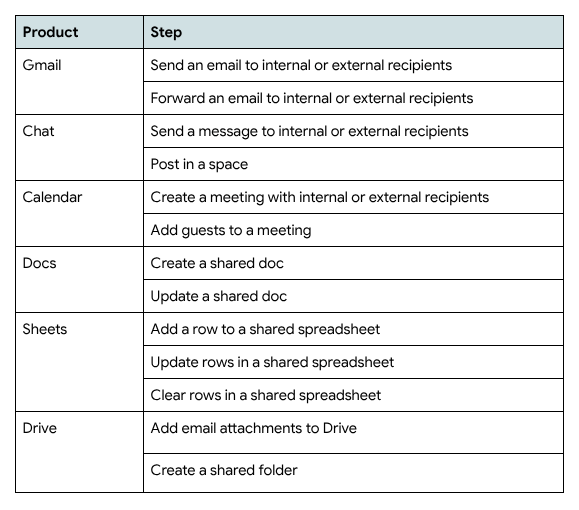
At its initial launch, Studio could only assist users with tasks such as drafting emails, rather than automatically executing actions like sending them. Now, Studio supports collaboration among multiple users by incorporating new steps accompanied by integrated control mechanisms.
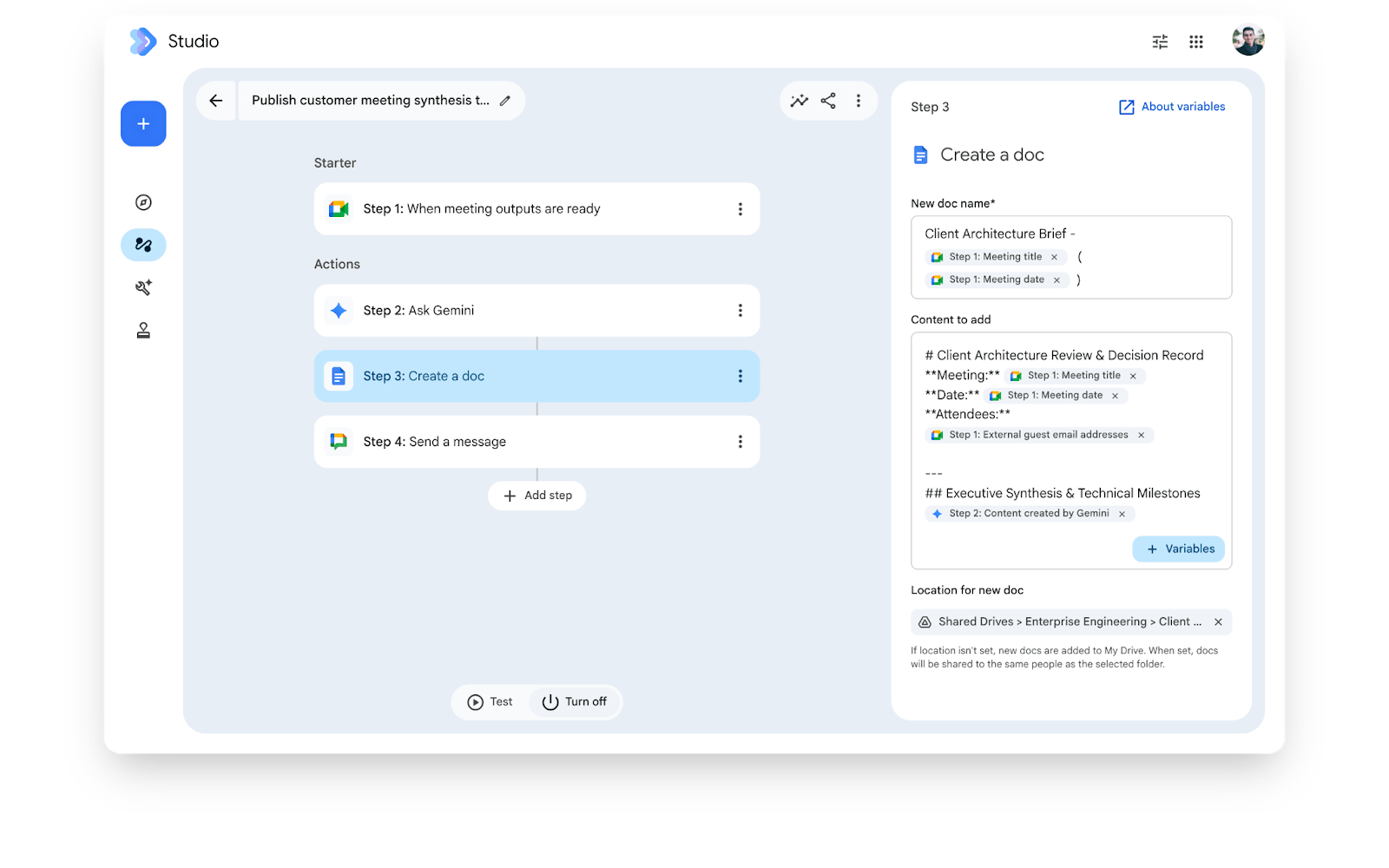
Identity of the agent: Automation processes using flows in Studio will continue to run under the user's identity but will adhere to the principle of least privilege. This means the flow will possess only the minimum set of privileges required for execution, rather than the full scope of privileges held by the owner. When active, the flow executes under a unique, auditable identity. Note: This least-privilege agent identity mechanism applies only to newly created flows; support for existing flows will be added in the future.
(Beta) Assign identityThrough a new setting, administrators can decide whether actions performed by a flow display the owner's identity or are attributed to the flow itself (along with the owner's information). This setting is enabled by default, meaning flow actions will be attributed to the flow. Note: This setting regarding the display of the executing identity applies only to newly created flows; support for existing flows will be added in the future.
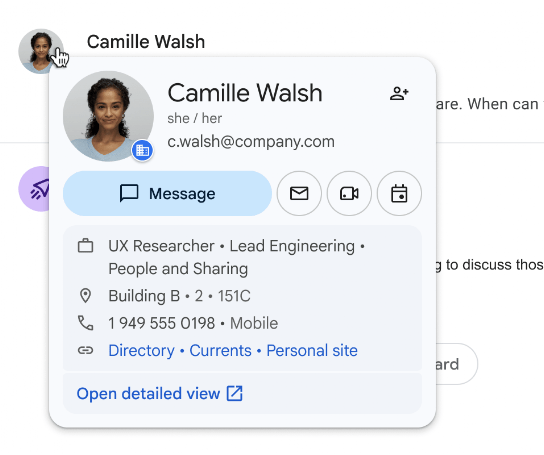 |
| The flow is represented as the owner's identity. |
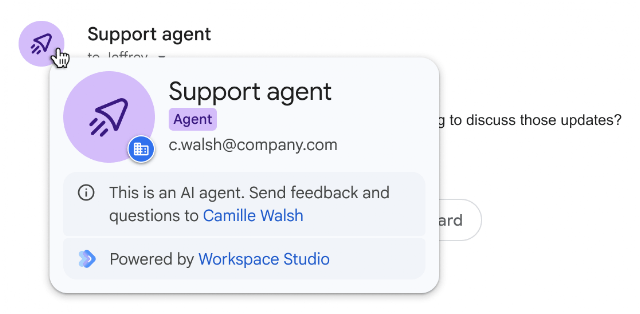 |
| The stream is assigned a name along with the owner's information. |
Auditability and observability: Studio operations related to configuration and execution are recorded in Studio audit events. Additionally, audit events for actions such as editing files in Drive or sending emails via Gmail include flow context, such as the flow's unique identifier and owner information. Note: Contextual information regarding the agent in audit logs applies only to newly created flows; support for existing flows will be added in the future.
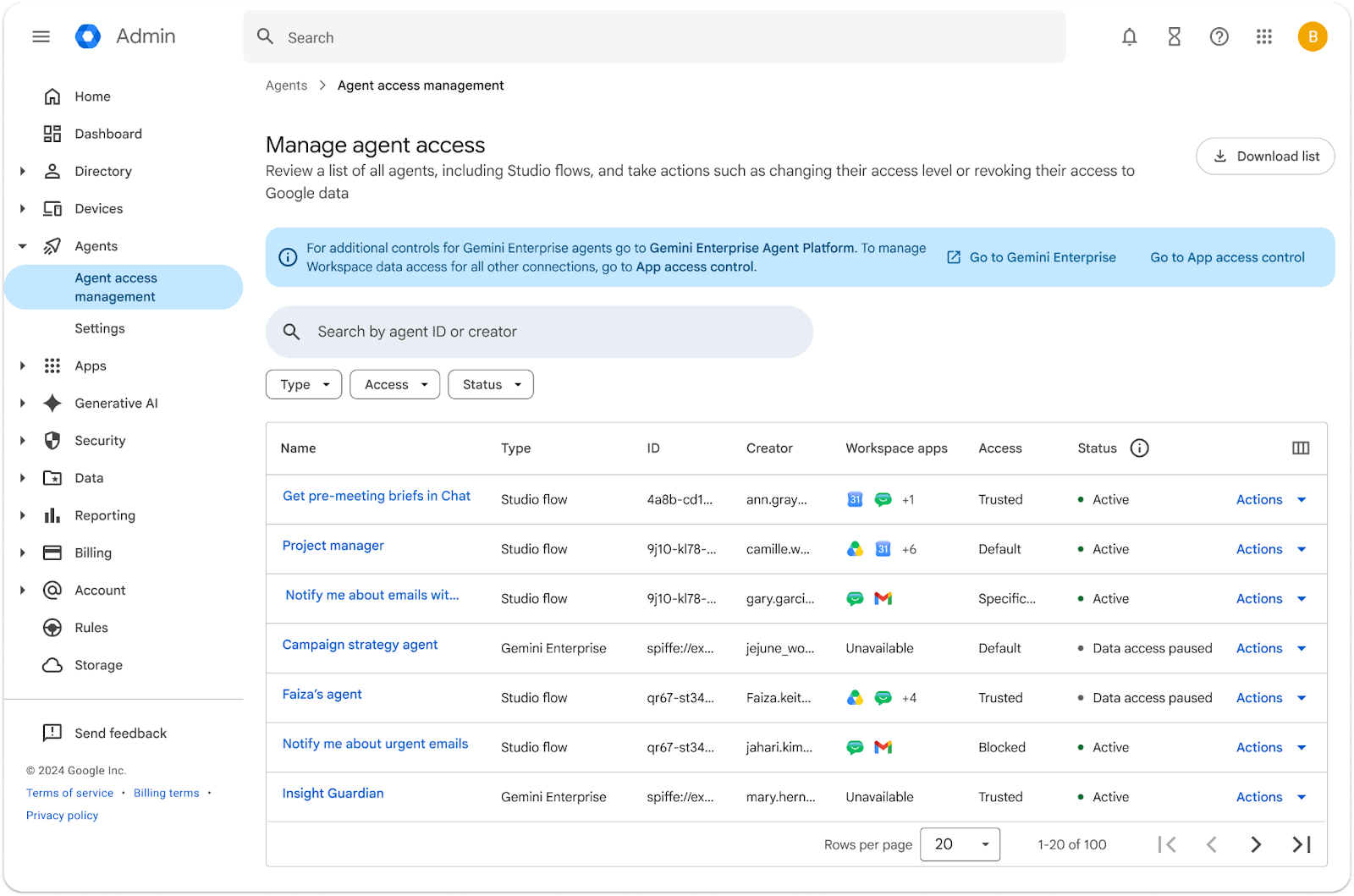
Agent access management: Within the administrator console, the agent access management dashboard allows administrators to pause all flows or specific OAuth scopes for individual flows (e.g., revoking access to Drive). Additionally, the security investigation tool enables administrators to navigate directly from an audit event to the agent access management page, thereby accelerating the remediation process. Note: Once the feature is rolled out, newly created flows will appear in the agent access management section; support for existing flows will be added in the future.
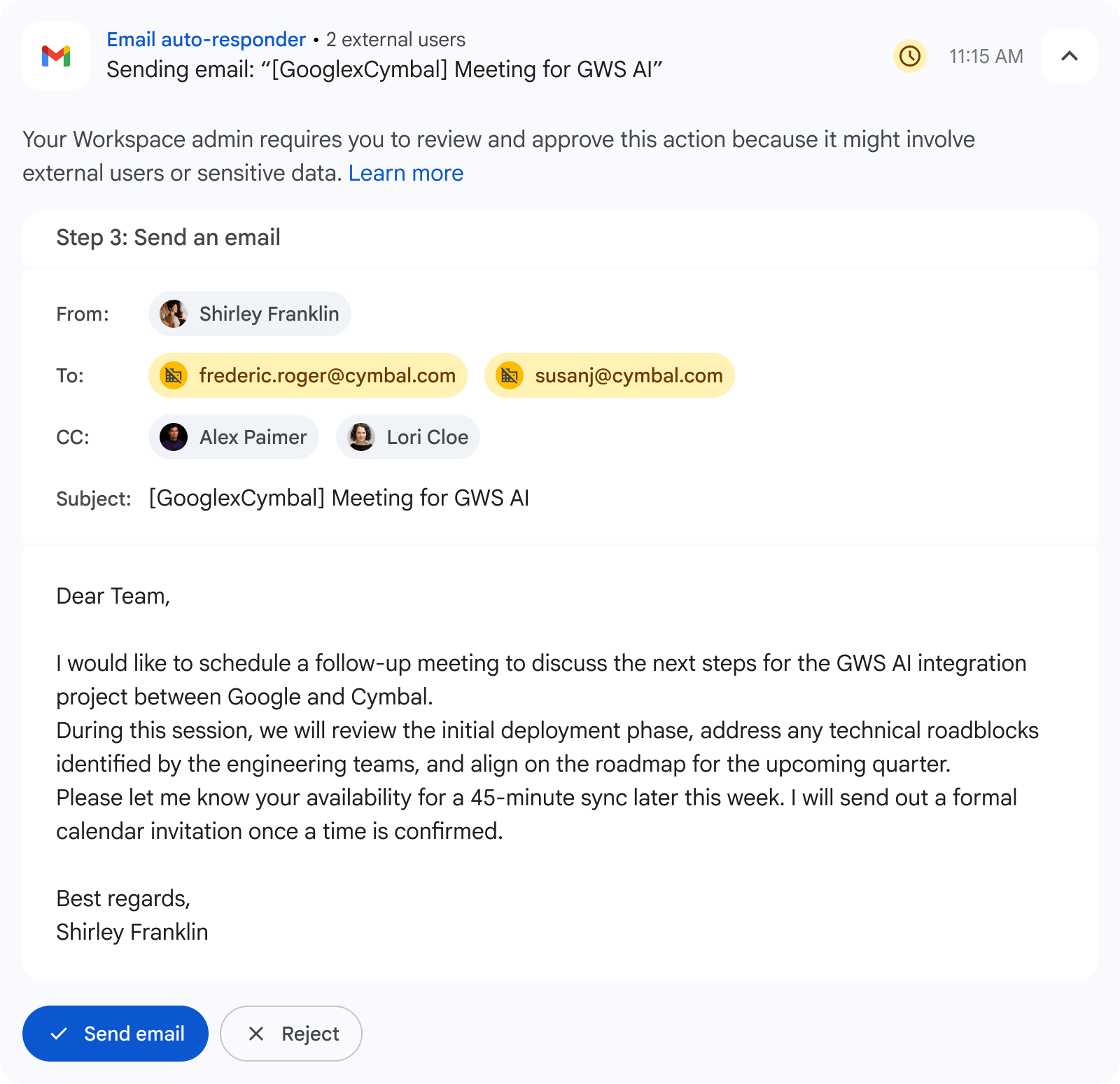
Governance setup & human-in-the-loop mechanisms: Additional administrative settings allow for disabling specific types of process steps, turning off Gemini data access, requiring end-user confirmation for external data-sharing steps, and disabling webhook integrations.
Real-time protection measures: Additional Data Loss Prevention (DLP) features for Gemini data access and Studio processes are now available to enhance protection. The DLP feature for Gemini restricts Gemini's access to Drive data based on content and label conditions, with support for additional services coming soon. The DLP feature for Studio supports restricting the execution of Studio processes—including blocking them or requiring end-user review—based on conditions regarding source data, data usage, and output data visibility.
Rollout pace
Set up the admin dashboard
- Rapid Release and Scheduled Release domains: Rollout begins today (it may take up to 3 days for users to see the changes).
Features visible to end-users
- For Rapid Release domains: The rollout begins on August 20, 2026 (it may take up to 3 days for the feature to appear).
- For domains in the Scheduled Release track: The gradual rollout begins on September 1, 2026 (it may take up to 15 days for the feature to appear).
(Beta) Assign identity
- Domains in the Rapid Release track: The rollout begins today and will take place gradually over 7 days.
- Domains in the Scheduled Release group: Gradual rollout (may take up to 15 days for the feature to appear) starting on August 24, 2026.
Applicability by version
- Google Workspace plans:
- Business: Business Starter, Business Standard, Business Plus.
- Enterprise: Enterprise Starter, Enterprise Standard, Enterprise Plus.
- Education: Education Fundamentals, Education Standard, Education Plus.
- Add-on packages:
- Google AI Ultra for Business
- Google AI Pro for Education
Managing Safety in the Agentic AI Era with Gimasys and Google Workspace Studio
Agentic automation within Google Workspace Studio represents a significant leap forward, enabling businesses to optimize resources and free up staff time. However, empowering AI agents to take action also presents complex challenges regarding information security, internal data compliance, and the prevention of external information leaks.
As a Senior Strategic Partner of Google Cloud in Vietnam, Gimasys ready to partner with businesses in establishing a comprehensive governance framework for the AI era:
- Standardizing security architecture: Assessing and establishing DLP policies, data security labels, and least-privilege configurations for the entire Studio automation workflow.
- Establish a "Human-in-the-Loop" control mechanism: Advise on approval processes for workflows involving financial or customer data, or data sharing with external partners.
- Training & Operational Support: Guiding the IT team on investigating incidents using the Security Investigation Tool (SIT) and fostering a culture of responsible AI adoption within the organization.
Doanh nghiệp của bạn đã sẵn sàng bứt phá cùng tự động hóa AI an toàn? Contact Gimasys today to receive in-depth consultation on advanced security solutions and the creation of smart workflows on Google Workspace!
Related Posts