


Gemini 4 Argon mang lại hiệu năng cấp độ biên giới (frontier performance) trong các…
Small businesses can now seamlessly import users from Microsoft to Google Workspace
Migrating from Microsoft to Google Workspace often causes apprehension among small businesses due to concerns about the complexity of account setup and data migration processes. To address this issue, Google is pleased to announce the beta release of a completely new migration method that simplifies user import as much as possible.
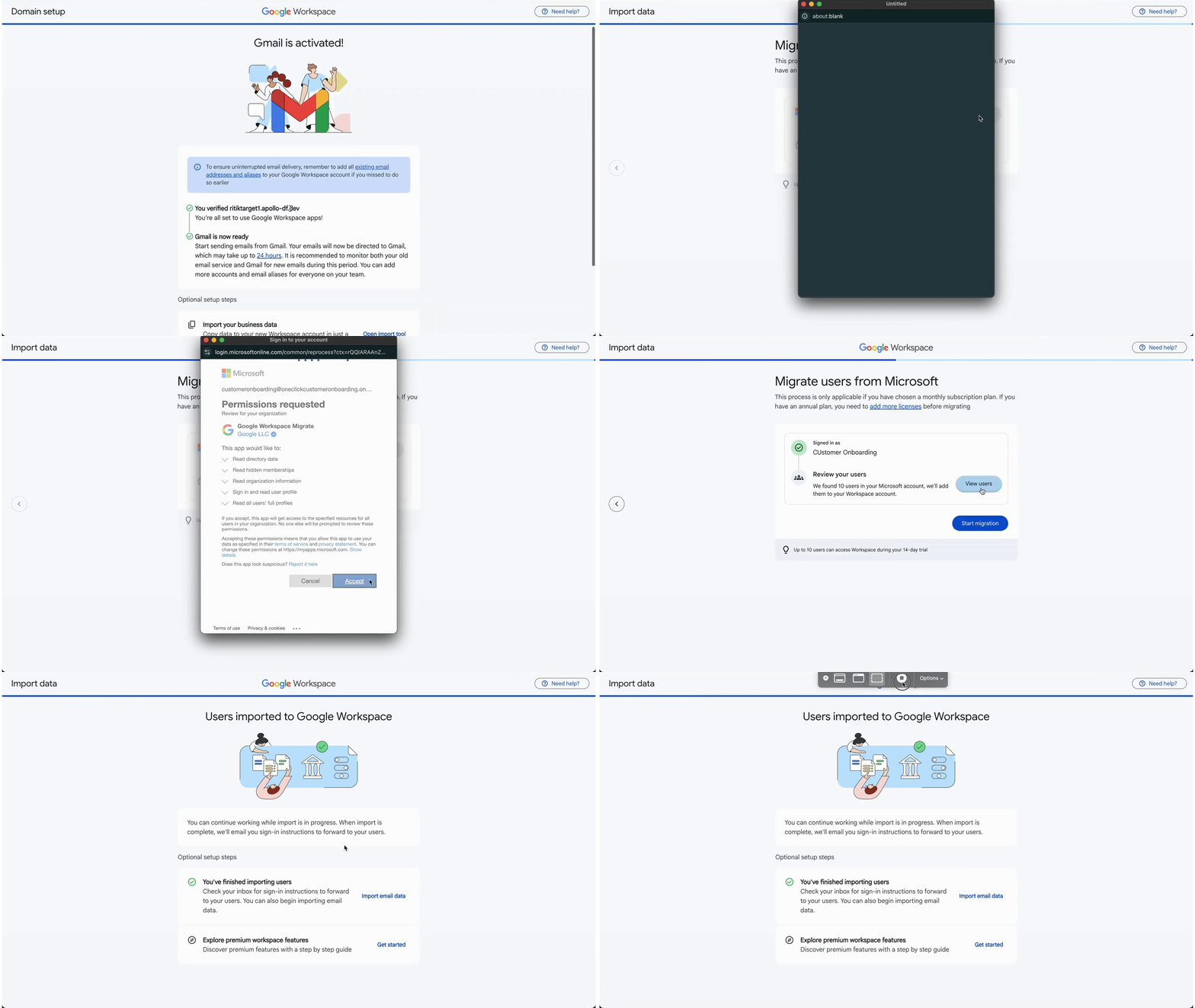
This new feature allows businesses and educational institutions to automatically copy existing Microsoft users to Google Workspace during the initial account setup.
After connecting with Microsoft, Google's intelligent system will automatically recognize users in your Microsoft account and prepare to add them to the new Workspace account. This breakthrough significantly reduces the time and effort required for manual operations, helping your organization quickly become stable and up-to-date within the new ecosystem.
What groundbreaking benefits does the new Import feature offer?
This new feature is designed with a "one-click" philosophy, allowing businesses and educational institutions to seamlessly replicate existing Microsoft users into Google Workspace.
3 core benefits for your business:
- Save 80% of setup time: After granting permission to connect with Microsoft, Google's AI system will automatically scan and identify users in the old Microsoft account and prepare a list ready to add to Google Workspace.
- Zero IT Skills Required: Administrators don't need to worry about configuring APIs or Excel spreadsheets with tons of complex information fields. Everything happens on an intuitive interface.
- Ensuring workflow continuity: Your employees can log into their new Google Workspace and immediately see their old data, helping the organization operate smoothly without a single minute of downtime.
Details of the synchronized data flow: Moving house but not losing belongings.
Công cụ nhập dữ liệu được tích hợp thẳng vào bảng điều khiển quản trị (Admin Console) của Google không chỉ tạo tên tài khoản (Account Name) mà còn hỗ trợ “chuyển nhà” toàn diện các dữ liệu quan trọng nhất:
- Email: Your entire inbox, sent emails, and folder structure from Outlook will be transferred intact to Gmail.
- Calendar: Regular meetings and scheduled events will be synced to Google Calendar.
- Contacts: Your customer and partner contact list is retained on Google Contacts.
- OneDrive to Google Drive: Files stored on employees' OneDrive accounts will be automatically transferred to Google Drive. (Specifically, Word, Excel, and PowerPoint files can be easily continued editing using Google Docs, Sheets, and Slides).
Procedure Guide (For Administrators)
Note: This feature is only visible and accessible to users with Administrator (Admin) privileges.
- Step 1: Begin registering and setting up a new Google Workspace account for your business.
- Step 2: Domain Verification. This is a prerequisite. You need to prove ownership of your company's domain name (e.g., @yourcompany.com) and activate email records (MX Records) to manage email flow.
- Step 3: Connect your Microsoft account. Just before the setup is complete, the system will suggest the option to import a user from Microsoft. Simply log in with your Microsoft Admin account to authorize them.
- Step 4: Click and Done. Select the users you want to transfer and click “Import”.
Important note regarding quantity limits:
This Quick Setup flow currently allows for the automatic import of up to 10 Microsoft users. If your company is larger (over 10 employees), Google still supports the migration through its enhanced Data Migration Service tool.
Deployment time & Supported packages
1. Release schedule:
This promising feature will begin rolling out on April 28, 2026 (applicable to both Rapid Release and Scheduled Release domains). Because this is a major update, it may take more than 15 days for the feature to fully appear on the dashboards of all users worldwide.
2. Available Editions
Google has been incredibly generous in expanding this tool to almost all customer segments:
- Business: Business Starter, Standard, and Plus
- Enterprise: Enterprise Starter, Standard, and Plus
- Education: Education Fundamentals, Standard, Plus
- Other Editions: Frontline Starter, Standard, and Plus; Essentials Starter, Enterprise Essentials, and Enterprise Essentials Plus; Individual; Nonprofits; Cloud Identity Free and Premium
- Education Add-ons: Google AI Pro for Education; Teaching and Learning; Endpoint Education
Related Posts